Showing posts with label paper. Show all posts

Tuesday, February 11, 2014

A distinctive type of paper notebook

So many manufacturers of paper notebooks just really make books.  The paper will vary, the type of lines will vary, the covers will vary - some give you perks like pre-numbered pages.... But they're still just books.  Books are all or nothing. You write in them till they're finished and there's absolutely no chance of "rearranging" pages.  You could use a ring binder (like a Filofax) but you don't like rings.  What do you do?

Well, perhaps you should consider an elastic-bound notebook.
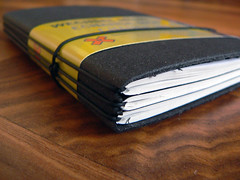
I recently came across not one but three different manufacturers of an interesting style of notebook that may just be right for you if you want more flexibility than, say, a Moleskine, but you don't want to be encumbered by metal ring mechanisms.

As shown in the image above (of an X17 notebook), this type of notebook lets one bundle together a number of thinner books, each for whatever purpose you wish.  Since, for instance, your journal booklet is not the same as your agenda booklet, it's easy to swap out a full journal for a new blank one and yet keep your agenda as is.
  • X17 is a German company.  It's offers a number of cover styles and types for inner booklets supporting various styles of agendas, organizers, and notebooks.  Each booklet is simply slid under one of several elastics that wrap around the spine.  The elastics hold the booklets in place.  Notches at the top and bottom of the spine keep the elastics properly aligned. Another elastic, tied at the spine, wraps around the cover to hold it closed.  There may be a risk that the elastics on the outside of the spine might catch on other objects.
  • X47 is the luxury model of the X17.  These have a system of metal hooks to hold the booklets in place and seem to be made of high quality leather.  They're quite pricey.
  • Whitebook is a Swiss company selling handmade leather-covered elastic bound agendas, organizers, and notebooks.  They use elastics, like the X17s, but the elastics are attached inside the leather cover; not being exposed, they shouldn't catch on anything.  Whitebooks can also house various types of tablet computers.  These too are quite pricey.
They all come in a variety of sizes.

I haven't tried any of them, but I'm thinking of trying a small X17.

If anyone has tried these notebooks, or have any thoughts on them, feel free to leave a comment.

Sunday, February 2, 2014

Paper beats laptop for learning

Here's an interesting bit of research: psychologists have found evidence that taking notes on paper improves learning and retention compared to taking notes on laptops.


The results of the experiments that led the researchers to this conclusion are soon to be published, but the tl;dr version is this: regardless of whether it's short term learning or long term retention (for, say, final exams), and even regardless of whether the students were told about the effect and how to counteract it, students who took notes by computer generally performed worse than those who took notes on paper.

According to the research, the difference between paper and laptop is that note-taking on paper requires a greater degree of cognitive engagement. You have to make an effort to take notes on paper, think through what you want to write, how to write it, and how to annotate it for later study - an effort that is not required when using a computer.

While I would expect this research needs to be validated by other, future experiments, I see this as supporting something most teachers already know from experience: you can't learn if you don't really invest in the whole process - there are no shortcuts.

Monday, May 28, 2012

Retro self-improvement app may just help form good habits

A few days ago, DESIGNTAXI published an interesting little post, about a "hipster app" - aka a sheet of paper with writing on it - that purports to help improve yourself in just 30 days.

Now before your Woo-meter goes into the red, please consider this thing just for a few minutes.


It's a small booklet that you can print onto a single page and fold yourself using the pocket mod folding technique.  And it's free, here.

What this thing lets you do is try to develop a positive habit.  Too many people think that all habits are bad.  Well, if you're Charles Manson, or Jason Bourne, they probably are (but for different reasons).  For the rest of us, habits can be very useful things.  You want to make a habit of brushing your teeth.  You want to make a habit of checking your blind spot when you're driving.  Why?  Because they are (a) good things that (b) you don't really need to think a lot about to do.  By forming good habits, you will naturally tend to take care of yourself better, work better, play better - all without the cognitive load of having to consciously manage those tasks.

We tend to form bad habits without really knowing we're doing it.  That means we don't really know how to form a habit - it just happens.  So, when you want to form a good habit... What do you do?

That's where the "Hipster Habit App" comes in.  It's easy to use - ridiculously easy to carry around with you - and it provides a template for you to form pretty much any habit you want.

I haven't tried it myself, but I must admit it looks good.  It's not too saccharine, not too geeky, and not too hard.  Of course you can't change yourself - you are who you are - but you can adapt.  You can tweak yourself - hack yourself, if you prefer - without worrying about changing your base code.  You can't change it anyways, so get over it.  The Hipster Habit App is an interesting, low-overhead way to do that.  It seems based on sound psychology (as far as I can tell), so except for the usual Your Mileage Will Vary disclaimer, I think this could actually work.

Monday, January 31, 2011

My first original tool: formatting AutoFocus

Pulling together bits from a number of sources, I've come up with my first task management tool.  It's a slight enhancement to AutoFocus - not in terms of method but rather in format.  That is, one thing I've noticed about AF is that little is said about how to arrange things on the page; I've come up with one possibility in that regard.

Here's an image showing a page written up in my format.  The goal was to balance the utility gained by adding structure to the page against the extra work needed to add and maintain that structure.


I'm using a simple spiral bound, quad-ruled notebook here.  This image only includes sample notes and tasks because the real pages in my notebook all have private information.

I prefer quad-ruled paper because I can use the book in either portrait or landscape and still have a usable space.  And the grid of lines helps me when I doodle rather than write linear text.  (More on both landscape mode notes and doodling in a future post.)

First thing I do when I start a page is draw in a rather wide left margin.  The margin is used to basically "tag" entries with keywords and a few other things.  The margin can be thought of as for "meta data" about a task.

Next I put today's date at the top of the body of the page.

Entries come in two basic types: notes and tasks.

Notes are for things like meetings, and generally writing down ideas, rather than actions I need to take. Notes are distinguished by their general topic.  I put the topic in the margin, to mark the beginning of a new "chunk," then just write out the notes.  Sometimes a note might be just one or two lines long; other times it might be several pages long and have a variety of tasks embedded in it.

This is one particular advantage, I think, of this format: since notes and tasks are kept together, you can put pretty much anything at all into a single notebook.  Having everything in one place is a big deal for me; no more multiple booklets and scraps of paper in jacket pockets.

Blank lines are your friend here.  A simple spiral bound notebook can cost less than $2, so there's no reason to be stingy with space.  Vertical space is important to clearly mark boundaries between items and to make sure you leave space for annotations you may add to items in the future.  And if you're worried about the environment, then you shouldn't be using a paper notebook at all.  But that's another post too.

Tasks are marked by a small box in the margin.  The box is useful because it not only lets you separate tasks from notes very easily, but it's also an anchor for other bits of task meta-data.

Completed tasks get a checkmark in their boxes.  Cancelled tasks get an X.

Delegated tasks are marked with a left-pointing arrow through the box.  Optionally, you may want to put  a marginal note indicating the reason for delegation.  I don't, but it might help you.

Finally, if a task is hung waiting on something, then I put a small circle in the box - small enough to be plainly visible if the box is empty, and yet vanish pretty much completely if I put a check, or an X, or an arrow through the box later.

The very last task on the sample page shows a task marked as important (the exclamation mark at the left side of the margin), and having a due date (the date between the box and the exclamation mark), and a completion date ('way over on the right side of the page).  I like the idea of having the dates at either end of the task, representing a span of time as it were.  It also makes sure I don't confuse due dates with completion dates.

You can use any variation of AF with this format.  That is, the format lets you keep the information you write a little more organized just by the way it's put on a page, while AF in any of its forms helps you sort through the actual tasks and get them done.

I note that if you prefer other forms of paper notery for this format, you do have some choices.  Circa makes some very interesting notebooks - which I also use.  The beauty of the Circa notebooks is that you can rearrange the pages as in a binder, but also fold the cover back on itself as with a spiral-bound notebook.  You can buy pages for Circa that are either plain grid paper or pre-printed to have a large left margin, special locations for dates, and so on.  Or you can buy a Circa hole-punch and use whatever kind of paper you like.  Circa notebooks work well and look better than the goofy spiral-bound notebooks.  I like their touch of class.

There are other manufacturers of disk-bound notebooks like Circa (I mention a number of them here), but I haven't looked into the kinds of pre-printed pages they have and how that might impact the format I propose here.

So there you have it: a simple way to organize content on a page to help you use AutoFocus.  It works great for me; your mileage may vary.


If you're interested in how this format came about, here's the short version: I read an article by Mark Forster for lifehacker.com where he mentioned how nice it would be to have both notes and tasks in a single notebook.  At the same time I was playing around with orgmode, an editing plugin for the Emacs text editor that does just that: combining journaling and note-taking with appointment and task management.  These two things, plus the notebook I keep on my desk at home, just kind of merged one day. And out popped this format.  I've been using it ever since.  Indeed, I'm even thinking of hacking orgmode  to support my page format.
Thursday, July 15, 2010

Keeping your monthly documents organized

It's important to keep some records: bank statements, bills, tax information, etc.  One can never tell when one will need those documents.  Like most people, I had for most of my life used hanging file folders in an old filing cabinet.  The thing got to be full to bursting, and mostly full of crap.  And the chore of de-cluttering it became so onerous that I just kept putting it off, which only made matters worse.

Then my dad died.  And while I was clearing out the family house, I discovered his way of tracking things, and was surprised to see how effective and efficient it was.  Since I was already in clearing-away-the-crap mode, I took some time to rearrange my own files and apply his approach.  Works like gangbusters.  So I thought I'd share it.


My dad's method is based on two things: using envelopes instead of folders, and distinguishing groups of items by date.  I've tweaked things a bit to accommodate the occasional weird items, but the basics remain.

Simple envelopes go far to stay organized.
I bought 500 No. 10 (i.e. standard business size) envelopes; they're quite cheap, especially in bulk.  Then I keep each year's bills/statements/etc for each source in its own envelope.  One for the phone, another for water, a third for TV, and so on.  I write the source and year on the short edge of each envelope.

I also keep one year's stuff, just in case.  At the end of each year, I toss stuff that's more than a year old.  This takes less than an hour, which is definitely not an onerous chore.  Because of the information involved, I shred the old stuff.  But a fireplace or wood-burning stove works just as well.  Since I keep a year's worth of stuff, I use elastics to pair up last year's and this year's envelopes for each source.

Some organizations use larger envelopes when they send stuff and they just fold the paperwork twice.  And some organizations - like insurance companies - send 'way more paper for even the slightest change than they really should.  That's why I also have the larger brown envelopes.

All these envelopes fit easily in one of my desk drawers, so they're out of the way and I can live free of hanging files and folders.  And it takes, I've found, just a few seconds to track down whatever envelope I need.

Simple cardboard boxes hold the big stuff.
Now, of course this doesn't cover everything.  Some things are just too voluminous to fold up into an envelope.  For those very few things, I just bought a few, thin Kassett cardboard file boxes from Ikea. They have fold-over lids and elastics to keep them closed.  I got them all in black cuz, like, I'm cool.  Those yellow tabs at the bottom of each are 2"x0.5" post-its on which I wrote what stuff goes in that box.  Again, remembering that I now purge old stuff religiously every year, these boxes are big enough to do the job, much safer than hanging files, and more discrete too.

One box is for our new house, another is for financial stuff and insurance, and so on.

How you decide to partition your records is up to you.  I would advise you to keep track of how your using the envelopes for a while.  Take note of situations in which this method is slowing you down or adding to your meta work.  Those would be bad things.  If you notice that this is happening, schedule some time to play around with how you use the envelopes.  Try to identify exactly what it is that's slowing you down, then focus on finding a way to fix it.

All I know is that this envelope trick of my dad's has really been great for me.  Your mileage may vary.