Tuesday, February 11, 2014

A distinctive type of paper notebook

So many manufacturers of paper notebooks just really make books.  The paper will vary, the type of lines will vary, the covers will vary - some give you perks like pre-numbered pages.... But they're still just books.  Books are all or nothing. You write in them till they're finished and there's absolutely no chance of "rearranging" pages.  You could use a ring binder (like a Filofax) but you don't like rings.  What do you do?

Well, perhaps you should consider an elastic-bound notebook.
I recently came across not one but three different manufacturers of an interesting style of notebook that may just be right for you if you want more flexibility than, say, a Moleskine, but you don't want to be encumbered by metal ring mechanisms.

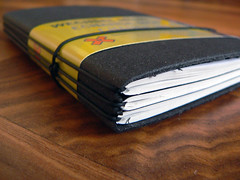
As shown in the image above (of an X17 notebook), this type of notebook lets one bundle together a number of thinner books, each for whatever purpose you wish.  Since, for instance, your journal booklet is not the same as your agenda booklet, it's easy to swap out a full journal for a new blank one and yet keep your agenda as is.
  • X17 is a German company.  It's offers a number of cover styles and types for inner booklets supporting various styles of agendas, organizers, and notebooks.  Each booklet is simply slid under one of several elastics that wrap around the spine.  The elastics hold the booklets in place.  Notches at the top and bottom of the spine keep the elastics properly aligned. Another elastic, tied at the spine, wraps around the cover to hold it closed.  There may be a risk that the elastics on the outside of the spine might catch on other objects.
  • X47 is the luxury model of the X17.  These have a system of metal hooks to hold the booklets in place and seem to be made of high quality leather.  They're quite pricey.
  • Whitebook is a Swiss company selling handmade leather-covered elastic bound agendas, organizers, and notebooks.  They use elastics, like the X17s, but the elastics are attached inside the leather cover; not being exposed, they shouldn't catch on anything.  Whitebooks can also house various types of tablet computers.  These too are quite pricey.
They all come in a variety of sizes.

I haven't tried any of them, but I'm thinking of trying a small X17.

If anyone has tried these notebooks, or have any thoughts on them, feel free to leave a comment.

Sunday, February 2, 2014

Paper beats laptop for learning

Here's an interesting bit of research: psychologists have found evidence that taking notes on paper improves learning and retention compared to taking notes on laptops.


The results of the experiments that led the researchers to this conclusion are soon to be published, but the tl;dr version is this: regardless of whether it's short term learning or long term retention (for, say, final exams), and even regardless of whether the students were told about the effect and how to counteract it, students who took notes by computer generally performed worse than those who took notes on paper.

According to the research, the difference between paper and laptop is that note-taking on paper requires a greater degree of cognitive engagement. You have to make an effort to take notes on paper, think through what you want to write, how to write it, and how to annotate it for later study - an effort that is not required when using a computer.

While I would expect this research needs to be validated by other, future experiments, I see this as supporting something most teachers already know from experience: you can't learn if you don't really invest in the whole process - there are no shortcuts.

Thursday, January 30, 2014

Toodledo trick: rolling tasks

Toodledo can sort your tasks in multiple, customizable ways.  I've found a neat "trick" that let's me generate a rolling list of tasks based on sorting tasks by their modification date.
I have a bunch of tasks that:
  1. are undated, and
  2. are not especially urgent, but should be done sooner than later, and
  3. may not be possibly completed in one sitting.
These are tasks that I want to poke at fairly regularly, but that are less important than other (say, dated) tasks.  The problem is finding a way to automagically rearrange them (so I have less meta-level task management to do) and still help ensure I don't neglect any of them for too long.

Toodledo can sort a task list in multiple ways.  One way is by modification date; if any field in a task is changed, the modification date is updated.  Whenever I work on one of those "better sooner than later" tasks, I update the Note field with a short status update.  This resets the modification date of the task (and also leaves me a hint of how far I'd gotten for the next time I work on the task).

Then I sort those tasks by reverse modification date.  This puts the task I most recently worked on at the end of the list.  More importantly, the tasks at the top of the list are the ones I haven't worked on for the longest time - which are the tasks I really should work on again as soon as I can.

So now, once I've gotten everything else out of the way (e.g. tasks due today, urgent/unavoidable things, etc), I work on one of the first tasks in that "better sooner than later" list.  If I complete it, I check it off and it's gone forever.  If I don't finish it, I update the Note field to remind myself for next time how far I'd gotten and refresh the list.  That item will move to the end of the list.

If you're a fan of autofocus-style productivity systems, this trick pretty much lets you implement autofocus in Toodledo.  If you're like me, and want more structure in your system without going full-GTD, then you can add whatever structural elements you like from Toodledo and still have that rolling list available.

Personally, I sort my Toodledo Hotlist using all three sorting parameters (Toodledo lets you choose up to three nested types of sorting).  My first sort is by Toodledo's "Importance" measure, which is a neat single metric that includes due date, priority, etc.  The second level sorts tasks that all have the same Importance as calculated by Toodledo; that's where I reverse-sort by modification date.  The third sort will sort tasks that have both the same Importance and the same modification date. My third sort is by priority.

Do you sort your Toodledo tasks differently?  If you do, leave a comment and share your insights.