Tuesday, February 11, 2014

A distinctive type of paper notebook

So many manufacturers of paper notebooks just really make books.  The paper will vary, the type of lines will vary, the covers will vary - some give you perks like pre-numbered pages.... But they're still just books.  Books are all or nothing. You write in them till they're finished and there's absolutely no chance of "rearranging" pages.  You could use a ring binder (like a Filofax) but you don't like rings.  What do you do?

Well, perhaps you should consider an elastic-bound notebook.
I recently came across not one but three different manufacturers of an interesting style of notebook that may just be right for you if you want more flexibility than, say, a Moleskine, but you don't want to be encumbered by metal ring mechanisms.

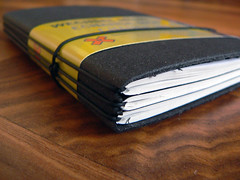
As shown in the image above (of an X17 notebook), this type of notebook lets one bundle together a number of thinner books, each for whatever purpose you wish.  Since, for instance, your journal booklet is not the same as your agenda booklet, it's easy to swap out a full journal for a new blank one and yet keep your agenda as is.
  • X17 is a German company.  It's offers a number of cover styles and types for inner booklets supporting various styles of agendas, organizers, and notebooks.  Each booklet is simply slid under one of several elastics that wrap around the spine.  The elastics hold the booklets in place.  Notches at the top and bottom of the spine keep the elastics properly aligned. Another elastic, tied at the spine, wraps around the cover to hold it closed.  There may be a risk that the elastics on the outside of the spine might catch on other objects.
  • X47 is the luxury model of the X17.  These have a system of metal hooks to hold the booklets in place and seem to be made of high quality leather.  They're quite pricey.
  • Whitebook is a Swiss company selling handmade leather-covered elastic bound agendas, organizers, and notebooks.  They use elastics, like the X17s, but the elastics are attached inside the leather cover; not being exposed, they shouldn't catch on anything.  Whitebooks can also house various types of tablet computers.  These too are quite pricey.
They all come in a variety of sizes.

I haven't tried any of them, but I'm thinking of trying a small X17.

If anyone has tried these notebooks, or have any thoughts on them, feel free to leave a comment.

Sunday, February 2, 2014

Paper beats laptop for learning

Here's an interesting bit of research: psychologists have found evidence that taking notes on paper improves learning and retention compared to taking notes on laptops.


The results of the experiments that led the researchers to this conclusion are soon to be published, but the tl;dr version is this: regardless of whether it's short term learning or long term retention (for, say, final exams), and even regardless of whether the students were told about the effect and how to counteract it, students who took notes by computer generally performed worse than those who took notes on paper.

According to the research, the difference between paper and laptop is that note-taking on paper requires a greater degree of cognitive engagement. You have to make an effort to take notes on paper, think through what you want to write, how to write it, and how to annotate it for later study - an effort that is not required when using a computer.

While I would expect this research needs to be validated by other, future experiments, I see this as supporting something most teachers already know from experience: you can't learn if you don't really invest in the whole process - there are no shortcuts.

Thursday, January 30, 2014

Toodledo trick: rolling tasks

Toodledo can sort your tasks in multiple, customizable ways.  I've found a neat "trick" that let's me generate a rolling list of tasks based on sorting tasks by their modification date.
I have a bunch of tasks that:
  1. are undated, and
  2. are not especially urgent, but should be done sooner than later, and
  3. may not be possibly completed in one sitting.
These are tasks that I want to poke at fairly regularly, but that are less important than other (say, dated) tasks.  The problem is finding a way to automagically rearrange them (so I have less meta-level task management to do) and still help ensure I don't neglect any of them for too long.

Toodledo can sort a task list in multiple ways.  One way is by modification date; if any field in a task is changed, the modification date is updated.  Whenever I work on one of those "better sooner than later" tasks, I update the Note field with a short status update.  This resets the modification date of the task (and also leaves me a hint of how far I'd gotten for the next time I work on the task).

Then I sort those tasks by reverse modification date.  This puts the task I most recently worked on at the end of the list.  More importantly, the tasks at the top of the list are the ones I haven't worked on for the longest time - which are the tasks I really should work on again as soon as I can.

So now, once I've gotten everything else out of the way (e.g. tasks due today, urgent/unavoidable things, etc), I work on one of the first tasks in that "better sooner than later" list.  If I complete it, I check it off and it's gone forever.  If I don't finish it, I update the Note field to remind myself for next time how far I'd gotten and refresh the list.  That item will move to the end of the list.

If you're a fan of autofocus-style productivity systems, this trick pretty much lets you implement autofocus in Toodledo.  If you're like me, and want more structure in your system without going full-GTD, then you can add whatever structural elements you like from Toodledo and still have that rolling list available.

Personally, I sort my Toodledo Hotlist using all three sorting parameters (Toodledo lets you choose up to three nested types of sorting).  My first sort is by Toodledo's "Importance" measure, which is a neat single metric that includes due date, priority, etc.  The second level sorts tasks that all have the same Importance as calculated by Toodledo; that's where I reverse-sort by modification date.  The third sort will sort tasks that have both the same Importance and the same modification date. My third sort is by priority.

Do you sort your Toodledo tasks differently?  If you do, leave a comment and share your insights.

Sunday, December 29, 2013

I'm calling bullshit on this technique to "beat procrastination"

Lifehack.org is a productivity website.  It's supposed to help people get their lives in order and live more happily.  Unfortunately, it - and  virtually every other productivity website I know of - has pretty low "quality assurance."  That is, some material available at Lifehack is good, some of it is rather terrible, and there's precious little way to tell the difference.

Case in point: It's no good getting furious if you get stuck, by Ally Leung.  It's hook is entirely unrelated to the meat of the piece, and the meat itself is pretty rancid.


The piece starts with a quote by Stephen Hawking about knowing when to pause a task on which you're not making progress.  Leung then magically equates the word "stuck" in the Hawking quote with procrastination, the bubonic plague of productivity wonks - or, as Laura Leigh Clarke calls it, "the silent killer of dreams."

1. The word "stuck" can be associated with procrastination, but needn't be always.  If you ponder Hawking's quote for more than a few seconds, you'll realize he's not at all talking about procrastination.

Who is Laura Leigh Clarke, you ask?  That's the author of the piece that contains the (alleged) answer to the question of procrastination posed by Leung, a piece linked at the bottom of Leung's own piece.

2. Lifehack gets you to visit two of their pages for the price of one promise of useful information.  This is a pretty blatant attempt to superficially "drive web traffic" without offering anything substantive in return.

Clarke's piece is summarized by this one paragraph: "The point is, there are some things we each love to do, that are within our natural flow, and there are things that make us feel stuck. The key to getting back into flow and overcoming the stuck-ness is simply a case of spending a greater proportion of your day on tasks that are within your flow. The degree to which you can do this, is the degree to which you will THRIVE."

Another way of saying this is: do what you want, not what you have to do.

And that is just plain wrong.  We don't live in a Star Trek universe where everyone can do whatever they want.  To get to do what you want, you will have to do things that you don't want to do.  Want to play guitar well?  Well, you'll have to practice, and practice, and practice till your fingers bleed.  Wanna be a heart surgeon?  You'll have to do go through years and years of training doing things that you'll think are stupid and absurd.

And even if you can get to do what you really want to do, there will be collateral indignities waiting for you at every turn.  I love to teach, but the administrivia surrounding it very nearly suck the fun and value out of it entirely.  I love being able to read the paper in bed with my wife, but to do that means working hard on things I don't really believe in - not because I've chosen to do those ugly things, but because they are quite literally inevitable.

See, that's not what the Hawking quote was on about at all.

Hawking encapsulated two important ideas in that quote.

First, actively trying to solve a problem isn't the only way to do it.  There is significant scientific literature indicating that once a problem is firmly nested in your wetware, it will keep running even if you're not consciously thinking about it.  Keith Sawyer, for instance, has demonstrated quite clearly (in my opinion, at least) that those magical, so-called "moments of inspiration" that we all have from time to time are really just the unconscious part of your mind sending a solution to the conscious part of your mind.  You think it's a revelatory moment only because you weren't conscious of all the work your brain was doing.

It is important, however, to study the problem very intensely before setting it aside from your consciousness.  In all documented cases of this sort of revelatory cognition having happened, it was preceded by intense study.

Second, Hawking recognizes that nothing is so important that it is worth one's active attention, to the exclusion of all else, for a protracted length of time.  Just because he set aside the question of information loss and black holes for 29 years does not mean he just sat around with his thumb up his ass.  He got all kinds of other incredible work done.

3. This relates in no way whatsoever to procrastination.

The question isn't even really about procrastination, it's about getting everything done and not just the stuff you want to do.

I've got my own way of doing that, but I haven't the time right now to write it up.  Once I do, I'll post it here.
Sunday, August 18, 2013

Journaling is good for you

Here's a post at BBC (16 August 2013) advising us that journaling is good for our health, but warns against "online" journaling.

Well, Duh!

I've long advised my students to get their ideas out of their heads and onto paper.  And not just to scratch out a few words intended to jar one's memory later, but really take the time to write out as precisely as possible what the idea is, and to come back often to revisit and revise it.

There's a good reason for this: once a thought has been externalized, it is in a way part of the objective world of reality rather than only part of the subjective world of our minds.  Entirely subjective things are notoriously difficult to analyze, learn from, improve, etc.  But if you've got it lying there in front of you, detached from whatever happens to be going on in your mind at that moment, then you can bring to bear the full arsenal of your brain's analytic capabilities.

The BBC article basically says that we can do that with our own emotions too.  When we journal about what happened to us and how we feel about it, we are preserving (albeit not particularly well, of course) our psychological and emotional state at the time.  There are two benefits, one immediate and one long-term.

The immediate benefit is that the act of expressing something seems intimately connected to understanding it.  Finding the right words to properly represent our emotions goes a long way to explaining to our own brains what we're actually thinking and feeling.  And your brain can use that to better and more fully integrate the described experience into your psyche.

In the longer term, you can learn a lot about yourself by re-reading your journal and reading what you thought about long-ago, barely-remembered experiences.  Of course, this benefit requires more discipline than many people have these days - you have to be diligent both about carefully documenting your life and making the time to go back and re-read attentively.

There's one proviso here: there is, as far as I can tell, both no benefit and many dangers to journaling "socially" - via the dreaded Facebook or some such.  As the fictional-but-nevertheless-wise Gregory House said: "Everybody lies."  And you lie to yourself too.  However, it is far more difficult to be honest to others than it is to yourself.  You ought to journal for your benefit alone, and not to seek advice or to titillate others, or to gain social standing.  You journal to understand yourself; that requires honesty; and honesty comes easiest in privacy.

There is also a danger - one that I think has been blown out of proportion, but that truly exists nonetheless - that if you "share" your journal, you will open yourself up to unnecessary and generally harmful criticism by people who don't really know anything about.

Obviously, this does not mean you can't use journaling software; of course you can.  I tend to use Evernote for that (but I also sometimes use pen and paper).  It's not about the tools you use, it's about the audience.  The proper audience for your personal journal is only you.

So, get in there and write!

Thursday, August 15, 2013

Updates on the companion site: tips & tricks

I have unfortunately neglected the companion website to this blog, for reasons not pertinent here. However, I have started to update that site and wanted to let you know.

There's all kinds of lists out there on the Web on how to be productive, creative, innovative,....  I noticed that many of them have very significant overlap.  That, for me, is a design problem: Why are there so many lists?  Why hasn't anyone yet thought to integrate all these lists together into a "best hits" list?


I've found that some items on some lists are better than others on other lists, but that the biggest problem is that there no "encyclopaedic" resource trying to stitch them all together into one authoritative reference on tips and tricks.

Well, I don't know why this is, but I'm started to address this perceived shortcoming by starting a list of my own.

Actually, I expect there to be a couple of lists, because I think there's at least a couple of areas covered by the lists I've seen that don't overlap much.  Being productive, for instance, isn't the same as being creative.

At the moment, there's just one list, and it integrates only two sources (fully referenced, of course) on innovation/creativity.  But that's just because the first two links I yanked from my "list of useful links I haven't got time to deal with yet" were both on innovation.

I must have over 50 such links hiding in "storage," and I keep finding more all the time.  So these lists will grow and become more refined with time.

The first list is on Being Innovative, and you can find it at: https://sites.google.com/site/dofastandwell/project-definition/spreading-ideas.

Saturday, June 29, 2013

Ring-binding wins my heart

I think it's official: after years of vacillation and procrastination, I've finally committed to ring-bound notebooks as my preferred way to stay organized.


I have for years now irregularly switched back and forth between ring-bound notebooks (mostly those of Filofax and Succes) and hard-bound notebooks (mostly Circa, Moleskine, and Leuchtturm1917), never quite being able to decide once and for all which best suits my needs.

Most recently, I forced myself to use, for the better part of a year, hard-bound books both for the small, in-my-pocket, just-in-case kind of book as well as the larger, take-to-meeting and think-deep-thoughts kind of book.  (In case you want to know, I was using a pocket sized Leuchtturm1917 softcover, and an A5-ish Legami - kind of an Italian Moleskine knock-off).  By doing this, I was able to quite crisply decide what the most important and unavoidable requirements are, for me, in a good book.

This is what I've come up with:

  1. I want to be able to reorganize the pages.  That is, I like to group pages by topic.  Personally, I find it easier to search for information later.  This gets rid of the need to "tag" pages, and track continuation pages, etc.
  2. I keep both temporary notes - which will quickly become useless - and long term, journal-like notes.  That means that some pages will be full of crap, and others of useful stuff.  A hard-bound book mixes those two up.  Pages for scratch notes are "wasted" in that I can't use them for more significant stuff.  In a ring-bound book, on the other hand, I can just replace spent scratch note pages with fresh new pages as needed.
These are my two single more important requirements.  Everything else is just icing on the cake if not total fluff.  Once I realized that, I also realized I really had no choice but to use ring-bound books.

And while I regret having to give up the... pleasure of using a hard-bound book (a pleasure, I note, that I cannot explain at all except to say that I get a sense of importance or significance form a hard-bound book that I find lacking in ring-bound books), I have always been compelled by evidence. And the evidence tells me that without question, ring-bound books are right for me.

So now I use a very slender Omega binder (I bought it "vintage" on eBay, and I cannot find others like it).  Its rings are small (about 13mm) and its just large enough to accommodate Senior sized Succes sheets.  I'll be replacing the larger Legami hard-bound book with an A5-sized binder that I also got from eBay and appears to be from China.  I'll blog about that one later.

For now I'll leave you with this boring image of my new Omega binder.

Saturday, January 26, 2013

Do you really need that deadline?

Most task management apps with any meat on them will let you have both dated and undated tasks.  In those cases, it can be a temptation to start adding deadlines to every task - even those that don't really have deadlines.  I suggest that this is a temptation you ought to resist.

Pocket Informant, Todo, Toodledo, Google Tasks,.... These are just some of the major task management apps that let you have both dated and undated tasks.  This makes a lot of sense, because knowing due dates are an important part of deciding what to do next.  People will often start with whatever needs to be done that day, and then, time permitting, worry about other tasks.

But there is a temptation - I feel it myself - to assign due dates to tasks that don't really have them.  That is, one may decide to assign a due date to a task not because it's actually due on some date, but because one merely wishes to be able to do it by then.  In combination with start dates or horizons, the temptation becomes even greater.

For instance, I need to call my aunt in Italy.  There's really no hard deadline for that, but I would like to get it done "sometime this week."  So I set it as a task with a start date of Monday and a due date of the following Sunday.

While that may seem perfectly reasonable, it can create a trap (which even I have fallen into - more than once).  The trap is this: as you assign due dates to more and more tasks that don't really have them, it becomes less and less likely that you will ever get to your undated tasks; and that can easily lead you to adding due dates to more and more of your otherwise undated tasks, just to increase the odds that you'll actually do them.  You end up, in the logical extreme, having due dates on all your tasks, and not knowing which due dates are real and which are only your preferences.  And that rather defeats the purpose of having due dates at all, doesn't it?

This also highlights the difference between a task's due date and its significance.  Some tasks just have to get done, even though they don't have a proper due date - getting one's annual physical examination, for instance.  Other tasks may have a hard due date, but the task itself isn't so significant - for instance, buying a new suit while a sale is on at your favorite clothing store.

This leads me to my preferred solution: I use due dates only for things that actually have due dates, and I use priorities - or whatever other mechanism afforded by the tool I'm using - to rank significance.  It would be nice if I could separately rate the amount of work required to complete a task (something I've written about before), but it seems that that's just not in the cards for now.

Friday, July 20, 2012

Lamy restores my faith in ballpoint ink

I love fountain pens for writing reflectively.  But when I'm working, I often wince at the thought of "wasting" a fountain pen on just scratching out some notes or tasks or phone messages or whatever. On the other hand, I've never found a pen - not even the ubiquitous Pilot G2 - that satisfied my note-taking needs.  All that has changed, though, thanks to Rotring and, especially, Lamy.


One of the things that had always annoyed me about my work journal - in which I keep meeting notes, various tasks, my phone log, etc. - was that it was all in one colour.  I would often trawl the web looking for interesting hacks for my notebook, and I would regularly see sample pages written on with inks of multiple colours.  It annoyed me.  I could really use different colours, but there's no way I was going to start carrying a collection of differently inked pens.

Also, I didn't like how faint the colour from most ballpoints was compared to the sharp darkness of roller-balls or fountain pens.  But using one of my beloved fountain pens seemed wasteful, as I mentioned.  And rollerballs only ever seem to work well for a dozen pages or so before they start to skip.  (I think it's that I have oily skin and the oil gets on the paper and the ink doesn't take to it.)

But then, one day, while poking around on eBay, I found this: a discontinued Rotring Visumatic.  The interesting part was that the seller wrote that he'd put in four new Lamy cartridges because, he insisted in the product's description, Lamy cartridges were the best.

I've got plenty of Lamy pens - none of them ballpoints; so I didn't really know if he was right.

But here was a sturdy, multicolour pen that might just let me have my cake and eat it too.  So I bought it.

That was one of the best purchases I've ever made.  The pen is well-weighted and balanced, quite solid, and surprisingly thin.  It has this amazing mechanism for selecting a colour.  You hold the pen horizontally, and click it.  Whatever one of the four colour tabs near the top of the pen is facing up, that's the colour of the cartridge that comes out.  Want a different colour?  Click the pen closed.  Rotate it till the right colour is facing up, and click it again.  I tell you it's hours of fun for the whole family!

The best part, though, is the ink itself.  I've never used a ballpoint ink that was as good as the Lamy ink.  Not too slippery, but not requiring much force to push either.  No scratching on the paper.  The line of ink is constant and blob-free.  Nice high contrast for all four colours.

I swear, I'll never use another ballpoint ink again.

Now, these Rotring pens are rather rare.  I've never seen one before - or since - on eBay.  But there are many four-colour Rotrings on eBay, and Lamy still makes four-colour pens, so it's quite possible to find one that will work well for you.

But whatever you do, and no matter how many colours you use, use the Lamy ballpoint ink!

(In a future post, I'll write about how I use those colours in my work journal.)

Friday, June 22, 2012

Hipster "notebook" - PocketMod

PocketMod is a very cool little trick, whereby you can turn a single sheet of paper into a small, multipage notebook with a few careful folds and one cut of your scissors.  And the PocketMod, the website, makes it even easier to design your own little notebook.

The site offers a wide variety of page templates which you can drag to any one of the 8 pages of an assembled PocketMod notebook, including calendars, writing guides, organizers, and many others.  Design your PocketMod in your browser, choose the paper size (8.5x11 by default) and send it to your printer.

If you're not familiar with how to fold a PocketMod, there's even video instructions available.  People have even used PocketMod to create little booklets for specific purposes, like this retro self-help notebook.

Whether you find it useful or not, you have to admit that PocketMod is a very clever design.

Thursday, May 31, 2012

Google helps researchers with new tools

Google has lately added new research functionality to both Google Docs and Google Scholar.  YAY Google!

In Google Docs, you there's a new Research Tool.  It will appear as a right sidebar, in which you can search - without leaving Google Docs - for web resources, publications (via Scholar), images, videos, etc.

What's really, really cool is that you can then select a search result and, at a click of your mouse, embed the citation into the Google Doc either within the text or as a footnote.  And you can choose whether the citation will be in APA, MLA, or Chicago format!

It's not powerful enough (yet) for professional researchers, but it's a godsend for high-school students writing essays, for journalists, and for some university work.  It would be nice if it could produce a conventional "References" section at the end of the document - like most scientists and engineers like it - and it would be even better if it talked to zotero, mendeley, and other citation management tools.

But even in its relatively simple form, it's still a fantastic step forward for Google Docs.

In Google Scholar, you can now build a "My Citations" profile page, that will hunt down all your publications, show you how often they've been cited, and calculate various factors that are supposed to indicate how your publications rank compared to the rest of your research community.  (Mine is publicly viewable here.)  And you can get citations to export from Google Scholar directly to bibtex and a bunch of other citation management systems (but not to zotero or mendelay - sniff, sniff).

It's wonderful to see Google provide better support for researchers.

Putting on your pants two legs at a time

Sometimes, you don't even notice you had a problem till you see the solution.  Thereafter, you can't understand how you could have ever been so blind.

If you wear boxer shorts, you may have had some difficulty in keeping them from bunching up when you pull up your trousers.  It wasn't a problem back in the 1940's because trousers were far roomier than they are these days.

And, if you're like me and getting on in years, your flexibility will start to suffer, and getting one's shorts to un-bunch when one is of a certain age can be a bit of a challenge.

Well, here's the solution.  It's a brilliant designerly way to look at the problem: stuff the boxers into your trousers first.  Without your legs in the way, it's easy to line everything up.  Then you just pull them both on at once.  Presto!  No bunching of the shorts!

Monday, May 28, 2012

Retro self-improvement app may just help form good habits

A few days ago, DESIGNTAXI published an interesting little post, about a "hipster app" - aka a sheet of paper with writing on it - that purports to help improve yourself in just 30 days.

Now before your Woo-meter goes into the red, please consider this thing just for a few minutes.


It's a small booklet that you can print onto a single page and fold yourself using the pocket mod folding technique.  And it's free, here.

What this thing lets you do is try to develop a positive habit.  Too many people think that all habits are bad.  Well, if you're Charles Manson, or Jason Bourne, they probably are (but for different reasons).  For the rest of us, habits can be very useful things.  You want to make a habit of brushing your teeth.  You want to make a habit of checking your blind spot when you're driving.  Why?  Because they are (a) good things that (b) you don't really need to think a lot about to do.  By forming good habits, you will naturally tend to take care of yourself better, work better, play better - all without the cognitive load of having to consciously manage those tasks.

We tend to form bad habits without really knowing we're doing it.  That means we don't really know how to form a habit - it just happens.  So, when you want to form a good habit... What do you do?

That's where the "Hipster Habit App" comes in.  It's easy to use - ridiculously easy to carry around with you - and it provides a template for you to form pretty much any habit you want.

I haven't tried it myself, but I must admit it looks good.  It's not too saccharine, not too geeky, and not too hard.  Of course you can't change yourself - you are who you are - but you can adapt.  You can tweak yourself - hack yourself, if you prefer - without worrying about changing your base code.  You can't change it anyways, so get over it.  The Hipster Habit App is an interesting, low-overhead way to do that.  It seems based on sound psychology (as far as I can tell), so except for the usual Your Mileage Will Vary disclaimer, I think this could actually work.

Monday, April 16, 2012

Moleskine "hacks" highlight a shortcoming of bound notebooks

While I may be a techno-geek, and proud of it, there's still something both seductive and beneficial about writing the old-fashioned way, with pen on paper.  And as far as that goes, the gold standard in notebooks is the venerable Moleskine.  Even more impressive, I think, than the notebooks themselves is the gargantuan community of Moleskine hackers; people who tweak, twist, cut, add to, remove from, and reinvent their notebooks for their own purposes.  But I think many Moleskine hacks actually underscore an intrinsic shortcoming of the bound notebook.

(Full disclosure: while I have used my fair share of Moleskine notebooks, and have several new ones waiting in the wings, I find myself these days being more drawn to Leuchtturm1917 notebooks.  This notwithstanding, this post applies equally well to all notebooks.)

A whole gaggle of Moleskine hacks can be found on Flickr and via Google.  If you take the time to look through them and sort through the duplicates and variations-on-a-theme, you'll start to see some trends.

  • Paginating these notebooks appears quite de rigeur.  (I note one reason I currently prefer Leuchtturm1917 is that they're pre-paginated and even have an index page at the front that you can use to create a table of contents.)
  • Forward and backward referencing is very common.  Since you can't rearrange pages in a bound book, many people need a way to relate pages that may be, in the book, quite far from one another topologically, maybe even in different books.  This is often done by numbering both the book and the page and then using double-number scheme like 3.45 to indicate page 45 in book 3.
  • Sectioning. Many Moleskine hacks involve adding tabs, post-its, or some other, usually coloured, marker to indicate the start of a section of a notebook.  This is particularly popular among those who use their notebooks to implement GTD or a related method.  This can cause people some grief as the notebooks, not having been designed for tabs, end up looking a bit messy; the tabs stick out past the cover and can become worn and frayed.  Some clever people have found ways of actually cutting the pages themselves - laborious as that is to do well - to create sections without having bits and pieces sticking out beyond the notebook's cover.  I note that Moleskine does produce one book that has cut-in tabs, the Info Book, but it only comes with lined pages.  And for those of us who prefer quad or blank pages, the lines are a royal pain.
  • Post-its for temporary notes.  I love post-its; they're infinitely flexible.  And there's something so significant and weighty about Moleskine notebooks that one is often loathe to just use them as scratch pads.  So many users add post-its to their Moleskine, for the sake of being able to quickly scribble things down, knowing that the post-its can be removed and recycled once that info has outlived its usefulness.  This leaves the notebook's pages clean for more "important" things.
  • The Moleskine as wallet.  While Moleskines and other high-end notebooks invariably come with a pocket inside the back cover for storing receipts, cards, etc., many users augment their notebooks with a variety of extra pockets - some literally turn their pocket-sized notebooks into full-blown wallets.
  • Pen loops.  Many notebook users want to be sure that they always have a good pen near their notebook.  The easiest way to do this is to have a loop on the notebook for holding one.  However, Moleskines don't have pen loops.  I personally buy adhesive pen loops from Leuchtturm1917; they'll work on anything.  Others use duct tape, elastic cloth, rubber bands, and fabrics to create pen loops.
There's plenty of other popular hacks for bound notebooks, but these are the ones I've noticed most often.

Here's my observation: most if not all of these hacks are already handled by another type of notebook - a ringed binder - and it can be done quicker and with less effort than any of these hacks.

Pagination can be done in a binder just as easily as in a bound notebook, but it's not really necessary.  The principal reason for paginating things is to be able to refer to information items that's cognitively close but topologically far.  With a binder, you can rearrange the pages so that topological distance is not an issue - thus, no need for pagination.

A similar argument can be made for forward and backward referencing.

Sectioning is rarely an issue with a binder because the binders are usually large enough to accommodate tabbed dividers.  And since you can add paper to any section in a binder, you no longer have the problem of filling one section of a bound book but leaving other sections only partly filled - and therefore partly wasted.

Post-its work just as well in a binder as in a bound notebook, but aren't as necessary.  Again, since a binder can be refilled at whim, it's not such a problem to use it for scratch notes.  Indeed, I have two kinds of paper in my binder: some good paper for important notes, and some cheap paper for scratch notes.  When I'm done with the scratch paper, I just tear it out of the binder and toss it into the blue bin.

Binders often come with an assortment of pockets in them.  My "senior" size Succes binder is a little larger and thicker than a pocket Moleskine, but has six pockets for business and credit cards, and two larger pockets for money or receipts.  And you can by extra card pockets too.  So binders are much closer to being usable wallets than are bound notebooks.

Finally, most ring binders come with pen loops.

So, to sum up: the most popular Moleskine hacks appear to address shortcomings that they do not share with ringed binders.  It would seem that users of bound notebooks are just trying to reinvent the binder, just without the rings.

The only serious and quantifiable measure in which bound notebooks like Moleskines beat binders is in robustness.  A Moleskine can stand far more abuse than a binder.

The other way in which bound notebooks beat binders is only qualitative, but still matters: prestige.  There's something special about a good bound notebook, like a Moleskine or a Leuchtturm1917, that many people just don't "feel" about binders.  In many ways, that's just as important - if you really want to use something, you'll use it better and more often than if you have to force yourself.

In the end, of course, all these books are just tools.  They're means to an end.  Whichever one gets you there best is the one you should use.

But still, if you're a big Moleskine hacker, you might want to ask yourself: are you a closet binder-user?

Tuesday, February 21, 2012

"Clear" is great, as far as it goes

A new "todo app" called Clear, by RealMacSoftware, has hit the App Store, to much more fanfare than usual.  Given it's novelty, and it's price - $0.99 CAD for a limited time - I couldn't help but try it out.  While it's UI is bloody brilliant, it's no where near enough for a "power user."  Great UI, but while it's long on style, it's short on functionality.

You can see all kinds of images and videos of Clear in action at its website.  This one doesn't really do it justice, but still it's better than nothing.

Clear's magic is in its UI, which is a brilliant mix of subtle animation and the simplest gestures you can possibly imagine.  Swipe right to complete a task; swipe left to delete it.

Right there, I see a problem.  What are the odds that someone will accidentally swipe left instead of right?  The odds increase dramatically because there is no confirmation for deletion (and Murphy's Law now kick in).

Pinching the list collapses it - and brings you "up" a level to the dashboard (of sorts): your list of todo lists.  Pinch again and Clear pops you up to the main menu.

Pulling down a list creates a new item.  Same with spreading (opposite of pinching) two items in a list. Touch-hold an item and you can move it around in the list.  The colours auto-adjust, on the premise that items further up the list are of a higher priority.

There's a few other features of the UI, but you get the picture.  It's very clever, and I found it insanely easy to use.  Fonts are large enough to read easily, and no tappable item is too small for one's fingers.

But.

All this app does is manage simple lists.  It does not handle due dates, repeating tasks, priorities, contexts, locations, tags, or any other advanced feature.  And it doesn't sync with anything.

Granted these are early days - Clear is only at version 1.0.1 - but there's just so much functionality that's missing, that Clear is clearly not a power user's choice.

I have also added Clear to my giant chart of iPhone task managers.

Wednesday, January 18, 2012

De-cluttering is de-lightful

I read this post at lifehacker, and it seemed to fit so closely with my way of doing it, I thought it was worth sharing.  The question is keeping one's home free of clutter.  It can be hard to do, but that's mostly because we keep putting it off.

The lifehacker post suggests a list of typical things one might want to get rid of in order to de-clutter, but the list is rather generic (and thus applies to only few people).  Also, the article doesn't talk much about how to go about it.  These are two things I'd like to cover here.


First: the list of things to toss.

I find that my own personal list doesn't line up well with the list in the lifehacker article.  But that's cuz I'm weird.  Things I toss include: old paperwork; old textbooks; old tests, exams, and other student work; old CDs with old software on them; stuff in my "someday" pile that I know is now "never."

You may find the list of things you tend to de-clutter is also different from both mine and the one in the article.  So how exactly do you make your list?  Here's a simple meta-list that you can use to review and identify things - and because it's meta, it should work for nearly everyone.  You should get rid of:

  • anything you haven't used in a year;
  • anything that's broken;
  • any document older than 10 years; and
  • extras anything that you have more than one of.

Of course, you may find there's some things really want to keep in spite of these rules - memorabilia, for instance; even if you don't use it, and if it's broken, and you have another one that works, I doubt you'd want to throw out your grandfather's gold pocket-watch.

These things, that violate the rules, need to be dealt with somehow.  If you leave them scattered about, you'll likely never deal with them.  Gather them all up and put them in boxes.  Label the boxes with something obvious, and don't put them in storage.  Leave them somewhere not really underfoot, but also not somewhere you'll forget about.  Keep them under your nose; make them an annoyance.  As more and more boxes accumulate, you'll get so frustrated that you'll set aside a Sunday afternoon and sort it all out.

Second: how to do it.

Here's what I do: once a week, I spend 15 minutes wandering around the house looking for stuff to toss. It might just be a magazine. Or it might be a chest of drawers. If I can't deal with it then and there (like the chest of drawers), I add it to a list of stuff to do the next free weekend I have.  I actually book it into my agenda because, for me, that lends a certain pressure to completing the task.  It also prevents me from overbooking my Sunday afternoons.

Sometimes, I do my 15 minute check just before bed; other times, while I'm having my morning coffee.  Sometimes, but rarely, I'll do it during a few successive commercial breaks during some TV program I'm watching.  The important thing is to book the 15 minutes to do this, and treat it like the important task it is.  Get it done the day you that you've booked it for.  This will help you form the good habit of not putting things off.

You might not notice a big change at first, but if you keep this up - a wee bit at a time - you'll start to notice a real difference in the amount of flotsam and jetsam you've got lying around.  And what's more, you'll be teaching yourself a habit that will prevent the junk from ever accumulating again.

Tuesday, January 17, 2012

Weave is threadbare

Weave, by Intuit.com, is an interesting task manager app.  It's visual design is nearly perfect, which is a great hook to make you want to try it.  It's free, so it won't hurt.  But there's some things about it that just don't work for me.

The app will not function without you registering at the Weave web service.  While I have no reason to think anything nefarious is going on there, Weave is the only task app I know of that requires you to register.  What are it's developers doing with that information?  I don't know.

Once you've registered, you're confronted with some tutorials on Weave's use.  You can't skip the tutorials.  This is, to me, the developers saying "You're an idiot and you can't be trusted to use this app without proper training."

Finally, once you've set everything up, the app seems to sync every time you start it.  It syncs in the foreground, thereby locking the app for a good five seconds or more.  Every time you start it.  This can really slow a user down if all they want is to fire off a quick little reminder.

As I mentioned, there's some great aspects to Weave - you can see them all by going to my comparison of iPhone task managers.  But there's enough hangups with Weave that I really cannot recommend it.

Tuesday, December 27, 2011

Tagging links: a hint


One of the more popular classes of productivity app is the social bookmarking app.  The principle behind sites like delicious, diigo, Google bookmarks, etc. is that a group of people will tend to reuse the same (or similar) bookmarks for similar items thus leadings, eventually, to a self-organizing collection of links.

Whether the hypothesis is a good one is, for my purposes here, irrelevant. (Personally, I think it is false because too many people seem unable to identify key and rather obvious tags associated with relatively obvious web resources.  But that's another story.)  These sites are also very useful for individuals simply trying to keep track of web resources for themselves.  I used to have a home-made system that treated keywords and tags as the same, which seemed to lower the number of tags one actually needed.  (I've not kept that system up just because I haven't time to nurse the code.)  Still, I find that existent systems are good enough - you probably will too.

But the question remains, how does one use tags in a sensible way?  This is a broad question that I don't really want to get into because it requires one to eventually call forth the cumulative knowledge of the library sciences with respect to categorizing resources.  And I know just enough to know that I don't know enough about that to comment intelligently.

There is one small "trick," though, that I've developed over the years, and that seems to work quite well for me.  It is this trick I'd like to share.

The trick involves trading off two goals: minimizing the number of tags one must remember and apply to a given resource; and capturing sufficient meta-data to be able to efficiently search for resources later.  I'll show the trick with and example.

Let's say you want to tag a resource as relating to decision making.  Depending on which site you use the syntax will vary, but most of the good sites allow multi-tag words or some approximation thereof.  I'll use double-quote to denote a multi-word tag, and I'll italicize tags to set them off from surrounding text.

There's three general techniques by which you can tag that resource.
  1. decisionmaking - jam multi-word tags into a single word, which has the merit of reducing the extra characters (underscores, spaces, quotes, etc.), but hurts readability.  And what about makingdecisions?  Does that count?
  2. decision-making or decision_making or "decision making" - You can separate words with special characters.  Some systems let you use hyphens; others support the use of double quotes to group multi-word tags.  I like hyphens because I don't have to hit the shift key to get one.  Other systems only allow underscores to join multi-word tags.  I find that annoying, but the underscore is a time-honoured mechanism for forming multi-word variable names in many computer languages - and since many of these systems started as some programmer's pet project…. Well, you know.
    Finally, some systems, like diigo, separate all tags with commas and allow spaces in tags.  This is perhaps the best, most natural, and efficient way of specifying multi-word tags.  That's one of the reasons why I have for a long time now used diigo.
  3. decision and making - The last technique is perhaps a little counter-intuitive, but this is in fact my trick: treat each word in a multi-word tag as a separate tag.
Why on earth would you treat a multi-word tag as a whole bunch of tags?  Doesn't that break the semantics of the single, multi-word tag?

Well, yes it does, on the surface.  But I think that's a result of limiting your thinking to just what tags are most appropriate in some objective way.  Rather, I think we need to think of how you (and possibly others) might search for resources based on those tags.

So, what simpler way is there to search for something than just typing all the tags as separate words?  And what is most likely to catch related resources that might also interest you?  I think it's the single-word tag approach.  It's also pretty efficient in the long run.

For example, if you search for decision in a collection tagged as I suggest, you'll find all the resources tagged with that term, including those tagged with decision and making.  On the other hand, if you had treated decision making as a single tag, your search for decision wouldn't find them.  If you don't know that decision making is a single tag, then you might not find anything useful.

Many systems will show you a list of tags that occur with the tag for which you're searching.  So a search for decision will show, among other related tags, making.  Those systems will also show you other related tags, some of which may trigger new ideas.

This means that what you're really doing is constructing an implicit taxonomy of terms, where, in this case, decision is the most general term, and decision making is an item under the taxonomic tree for decision.  And it all happens naturally without any effort on your part.

So, as far as I can tell, treating multi-word tags as lists of single word tags is one of the easiest ways to enter tags, one of the most natural ways to search tags, and self-constructs a taxonomy of meta-data along the way.

Win-win-win, right?

Sunday, July 3, 2011

Updated iPhone Task Manager Chart

I maintain a comparison chart of iPhone task management apps.  It's not very big yet, but I'm working on it.

I've updated the ratings of all apps currently in the chart.

I've also changed the presentation.  I've also colour-coded the values in the chart, so its easier to get an overall sense how the apps compare.  Red is "bad," yellow is "medium," and green is "good."  This is, of course, all based on my analysis.  Your milage may vary.

I note with interest that Taska seems to be the best, except for the bugs that seem to keep messing it up.  Too bad there hasn't been any activity on that app since Sep 2010.

Monday, June 13, 2011

Zotero: maintaining online bibliographies

Zotero is a bibliographic application developed at George Mason University, and it lets you manage, share, and export bibliographic information on the internet and locally on all your computers.  It's not the only package of its kind, but I think it's the best of the lot.


Zotero started life, and still works as, a browser plugin for Firefox.  It's very clever because it recognizes (most) web pages that contain citable documents, and lets you add that resource to your zotero library with one click.  You can of course add items manually if you want, and if you have a PDF or other file that contains a citable work, you can load it into the zotero plugin with drag-and-drop, and then have zotero scan it and search the internet for the bibliographic information to match it.  You can also tag any resource however you like, to make searching easier and faster.

You can create collections of resources and share them with other people.  This is great for students who are working on team projects, and also for researchers and academics who want to share resources with their students and colleagues.

And of course, you can export selected items in formats consistent with a variety of document processing packages, so you can largely automate the construction of the bibliographies in your own publications.

The one big problem with zotero used to be that it only worked with Firefox.  Many people had complained about this but its developers were adamant in not wanting to support different versions for different browsers.  As a Google Chrome user, I really found it annoying to have to keep Firefox open just for the sake of zotero.

But then they came up with a novel solution: create a standalone version that doesn't require a browser, and just write tiny, little plugins for the browsers that talk to the standalone version.  Granted, the standalone version is still in beta, but I've been using it regularly for quite some time and it seems to work just fine, almost all the time.  Occasionally, it has difficulty accessing the zotero servers - but that is quite rare.

There's a lot of useful information about zotero on their website, and I would encourage you to consider it if you're looking for a web-enabled way to manage your bibliographic information.